
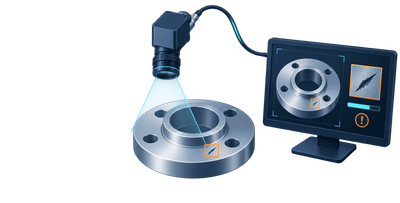
Can a camera reliably identify damage, a missing component or an assembly error? IBM Maximo® Visual Inspection (MVI) provides tools for building computer vision models that evaluate images of assets and products. The result can alert a technician to a suspicious condition or support an automated inspection process.
Deploying MVI alone does not guarantee a reliable inspection. Success depends primarily on a clearly defined task, representative image data, controlled capture conditions and an agreed response when a defect is found. A focused pilot with measurable acceptance criteria is therefore the right place to start.
What MVI actually does
MVI uses artificial intelligence to analyse visual data. Its no-code environment supports preparing and labelling data, training models and deploying them to evaluate new images.
Two common tasks are particularly relevant:
- image classification assigns an image to a predefined category, such as acceptable or defective;
- object detection locates and marks a specific object or defect within an image or video.
MVI is not a universal camera that automatically understands every asset. A model learns a specific visual task from the examples provided. If the difference between an acceptable and defective condition is not sufficiently visible in the image, AI cannot reliably recover the missing information.
Where visual inspection can add value
Suitable use cases can include:
- distinguishing correctly and incorrectly assembled products,
- checking whether a component is present and correctly positioned,
- locating a defined type of surface defect,
- identifying visible damage, corrosion or leakage,
- recognising a recurring asset condition,
- workplace safety monitoring, for example an approaching forklift or material-handling vehicle, or missing personal protective equipment (PPE),
- asset and property protection, for example detecting intruders in CCTV footage,
- detection based on infrared or thermal images and heatmaps,
- detection based on X-ray images,
- detection based on ultrasound images,
- pre-sorting images for review by a specialist.
The deciding factor is not the industry or the size of the asset, but the repeatability of the decision. The more precisely the target condition can be described, the more effectively the data, testing process and operational response can be designed.
A more difficult case is one where defects cannot be distinguished in a standard image, for example because of poor image quality, or where the result depends on information the camera cannot see. In such a situation, it may be more appropriate to combine image data with measurements, equipment history or the judgement of an experienced technician.
Mobile inspection or automation on an edge device?
IBM Maximo Visual Inspection enables the deployment of visual models to mobile and edge devices, across two different operating scenarios.
In a mobile inspection, a technician captures an image at the point of work. MVI Mobile supports local and remote inferencing for image classification and object detection models. Maximo Application Suite 9.2 also highlights local inference directly on the device, allowing a result to be produced without sending every image away for remote processing. The public IBM product page currently explicitly lists iPhone for the MVI Mobile application (Android supports remote processing on the server only); device compatibility should therefore be verified during solution design.
MVI Edge is intended for repeated or continuous inspections using connected cameras, specialised imaging systems, drones or vehicle-mounted devices. The model runs close to the image source and can respond quickly when a defined condition is detected.
Local inference does not mean that the complete model lifecycle can operate without infrastructure or connectivity. Model preparation and management, distribution, result synchronisation, security and integration with operational processes still need to be addressed.
The images are the most important part of the project
A model does not learn from the wording of a requirement. It learns from examples. The images must therefore represent the conditions in which the future inspection will operate. A few ideal photographs taken on a table are not enough if the solution is intended to be used in a production hall, outdoors or on equipment viewed from different angles, during the day and at night and in all seasons.
The dataset should cover:
- acceptable and defective conditions,
- normal variations of the asset or product,
- changes in lighting, background, distance and camera angle,
- dirt, reflections and partial obstruction where these occur in operation,
- visually similar cases that require different outcomes.
There is no universal minimum number of images. The requirement depends on the complexity of the defect, environmental variation and the required level of reliability. A diverse and correctly labelled dataset is more valuable than a large collection of nearly identical photographs.
Accuracy alone is not enough
A pilot should not be judged by a single accuracy percentage. Different errors have different consequences:
- a missed defect can lead to downtime, a quality claim or a safety risk;
- a false alert creates unnecessary checks and gradually reduces user confidence.
Before training starts, the team must decide which error is more serious for the process. The model should then be evaluated against a separate set of images that was not used for training. MVI 9.2.0 strengthened the model lifecycle with post-training validation against user-provided ground-truth data.
Even a well-tested model should not be treated as permanent. A new product variant, different lighting, a replacement camera or a change in the environment can affect its results. Production operation therefore needs error monitoring, model versioning and a controlled process for adding new examples.
What happens after a defect is detected?
Detection is not the final outcome. Value is created only when the result triggers a clear action. Depending on severity, the next step might be:
- alerting a technician and requesting confirmation,
- recording an inspection result,
- sending the image to a specialist,
- creating a service request or work order,
- stopping or rejecting a product according to the rules of the process.
Not every detection should generate work automatically. Human review remains appropriate for uncertain or safety-critical cases. Decisions should be automated only when the rules, reliability and responsibility are clearly established.
How to structure a useful pilot
The first pilot should test one clearly bounded inspection rather than every visual task in the organisation.
A practical sequence is:
- Define the decision. What exactly should the model identify, and what should happen afterwards?
- Check visibility. Can a person reliably see the required difference in an image from the intended device?
- Prepare the data. Collect and correctly label representative images, including difficult borderline cases.
- Separate the test set. Evaluate the model on images it did not see during training.
- Set acceptable error levels. Define the required defect detection rate and tolerance for false alerts.
- Test the operating scenario. Use the actual device, lighting, connectivity, response time and user workflow.
- Design the follow-up. Decide where the result is recorded, who verifies it and how the next task is initiated.
A useful pilot does not have to result in an immediate full-scale rollout. It can also show early that image capture must be changed, more data is needed or the use case needs to be narrowed.
Installation and operation are part of the solution
MVI is part of IBM Maximo® Application Suite, and its server components operate within the platform’s containerised environment. An edge scenario adds equipment close to the image source and camera connectivity. Before the architecture is selected, the team needs to understand expected image volumes, training and inference patterns, response-time requirements, data retention and security restrictions.
The architecture should follow the use case. A mobile inspection of a few assets each day has very different requirements from continuous production-line analysis using several cameras. In addition to installation, the operating model must cover access control, updates, backup, monitoring and the controlled release of new model versions.
MVI 9.2.0 introduced role-based access to Visual Inspection data along with usability and model-lifecycle improvements.
Start with the problem, not the camera
IBM Maximo® Visual Inspection can accelerate repetitive checks, make their evaluation more consistent and bring AI assistance directly to a technician or the image source. The main value, however, does not come from training a model alone. It comes from connecting reliable recognition to a specific decision and a maintenance or quality process.
12servis s.r.o. helps organisations assess candidate inspections, prepare a pilot, design the technical architecture and connect the result to the IBM Maximo® environment. A sensible first step is to verify whether the target condition is genuinely recognisable in the available images and whether earlier detection would deliver measurable operational value.
Sources
- IBM: Asset inspection with Maximo Application Suite
- IBM: Introducing Maximo Application Suite 9.2
- IBM Documentation: Integrating with Maximo Visual Inspection Mobile
- IBM: Maximo Visual Inspection 9.2.0 GA release
- IBM: Maximo Visual Inspection Service Update 9.2.1
- IBM: Maximo Application Suite releases