
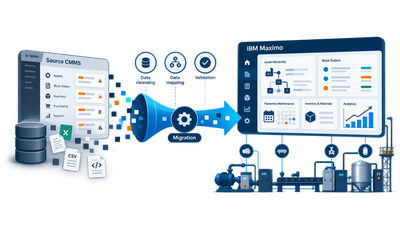
Moving to a new maintenance management system does not mean starting from scratch. Asset records, work orders, preventive maintenance plans, failure history, spare parts, and meter readings can represent years of work and valuable operational knowledge.
Data migration is therefore a central part of a move from ACT-IN Maintenance Control, Profilax, Excel, or another CMMS to IBM Maximo® Manage. A sound migration is more than exporting tables from the old system and importing them into the new one. It is also an opportunity to review data quality, improve the asset structure, and decide which information will remain useful in future operations.
What should be migrated from the existing system
The scope varies considerably between organizations. ACT-IN Maintenance Control, for example, covers operational and asset structures, maintenance requests and work orders, preventive maintenance, spare parts, and other maintenance processes. It can also connect to ERP and manufacturing systems or Condition Monitoring solutions. ACT-IN states that its applications use a shared MS SQL database and support data integration with other enterprise systems.
Before designing the migration, determine:
- which machines, assets, and other objects the source system contains,
- how they are arranged into hierarchies and locations,
- how requests and work orders are recorded,
- which preventive maintenance plans are active,
- which asset and failure classifications are in use,
- whether the system contains meters and reading history,
- how spare parts and storerooms are recorded,
- whether documents are attached,
- which other systems connect to the current CMMS or EAM system,
- how much historical data will remain valuable in future operations.
Only then can the target structure in IBM Maximo® be designed.
Migration is not a one-to-one copy
Every system organizes data differently. Reproducing the source database structure inside Maximo should not be the objective. Each item must instead be interpreted from a maintenance perspective and assigned to the appropriate part of the Maximo data model.
A typical mapping might look like this:
| Source CMMS or EAM | IBM Maximo® Manage |
|---|---|
| operational structure | Organizations / Sites |
| technology location | Locations |
| machines and equipment | Assets |
| maintenance requests | Service Requests |
| work orders | Work Orders |
| preventive maintenance | Preventive Maintenance |
| standard work procedures | Job Plans |
| maintenance personnel | Person / Labor |
| materials and spare parts | Items / Inventory |
| warehouses | Storerooms |
| suppliers and service companies | Companies |
| operating values | Meters / Meter Readings |
| technical documentation | Attachments |
| asset and failure categories | Classifications |
This is not a universal converter. The actual mapping depends on how the organization uses its current system and, more importantly, how it intends to manage maintenance after the move to Maximo.
Asset or Location
One of the most important migration decisions concerns the hierarchy of assets and locations. An existing system might contain a structure such as:
Plant → Hall → Production line → Press → Hydraulic unit
The Maximo design must determine which elements become Locations and which become Assets, how they relate to one another, and at what level work orders, costs, and preventive maintenance will be recorded.
A poorly designed hierarchy affects maintenance planning, failure analysis, reporting, cost tracking, and future analytics. The data model should therefore be settled before bulk data is imported.
The new system does not have to inherit old errors
Migration is a good opportunity to review data quality. After years of use, a single machine may have several names, such as “Press 1,” “PRESS01,” “Press no. 1,” and “Hydraulic press 01.” Similar inconsistencies often occur in failure codes, manufacturers, spare parts, and classifications.
Mechanical transfer would simply move the same problem to the new system. A migration process will therefore normally include:
data analysis → cleansing → normalization → mapping → transformation → import → result validation
For larger databases, analysis and cleansing can account for a significant part of the migration project.
Is the complete maintenance history required
Not necessarily. It is useful to divide the data into at least three groups.
Master data
This includes assets, locations, classifications, people, materials, storerooms, and suppliers. These records normally form the foundation of the future system.
Active operational data
Open work orders, current requests, and valid preventive maintenance plans are usually required for the transition as well.
Historical data
Thousands or millions of closed work orders from previous years require a different decision. An organization can:
- migrate the complete history,
- migrate a defined period, such as the most recent years,
- migrate only records needed for reliability analysis,
- retain the old database as an accessible archive.
The decision should be based on what people will actually use in the new system, not only on what can technically be transferred.
Data must be migrated in the correct order
Objects in an EAM system are connected. A work order can refer to an asset, a location, a person, material, and a failure classification. Those objects must exist in the target system before the work order can refer to them.
An illustrative migration sequence is:
- organizations and sites,
- locations,
- assets,
- classifications and lookup values,
- people and companies,
- items, storerooms, and inventory,
- job plans,
- preventive maintenance,
- open work orders,
- work order history,
- meters and operating history.
The exact order must reflect the dependencies in each project.
How data reaches IBM Maximo
IBM Maximo® Manage provides several standard methods for integration and data import. The Maximo Integration Framework and its Object Structures are central components. Object Structures define Maximo business objects and their relationships for inbound and outbound data processing.
Maximo Manage supports, among other options:
- XML, JSON, and flat files including CSV,
- REST APIs,
- external systems,
- interface tables,
- file-based and batch imports.
IBM notes that application import is synchronous and is unsuitable for large volumes because the user-interface session can time out. Larger migrations can use asynchronous file imports, interface tables, external systems, or appropriately designed API and batch processes.
Large migrations therefore do not have to rely on manual data entry. Given a suitable export or access to source data, a transformation process can convert the records into the structures Maximo requires.
Existing integrations also need a migration decision
A maintenance system is rarely isolated. It may exchange data with ERP, purchasing and inventory, MES, production equipment, Condition Monitoring, BI and reporting, human resources systems, or external service applications.
ACT-IN, for example, lists integration with SAP, Microsoft Dynamics/Axapta, Navision, Oracle, JD Edwards, QAD, and other ERP systems, as well as connections to MES components and technology systems.
Each current integration needs an explicit decision: retain it, replace it, redesign it, or retire it. A move to a new EAM system is therefore often an integration project too.
Handling Condition Monitoring data
Operational and sensor data form a special category. If the source solution stores large volumes of readings from production equipment, transferring every historical sample to Maximo may not be the right approach.
Depending on the architecture, it may be more useful to migrate:
- definitions of relevant meters,
- the latest or otherwise significant readings,
- alarms and events,
- values needed for maintenance,
- aggregated history.
High-volume time-series data can remain in a system designed for its storage and analysis. This decision should be made during migration design.
Rehearse the migration before production
The production cutover should not be the first time the complete data set enters Maximo. A practical process can include:
- Pilot import. Use a small sample to verify the structure and transformation rules.
- Full test migration. Load a representative or complete data set into a test environment.
- Data checks. Verify record counts, relationships, lookup values, statuses, and other critical information.
- User acceptance testing. Maintenance planners and technicians confirm that assets, work orders, and history are usable as expected.
- Cutover rehearsal. Test the complete procedure, its duration, and every prerequisite for launch.
- Production cutover. Perform the final export, transfer the latest changes, validate the result, and move to the new system.
This sequence substantially reduces the risk of discovering a serious problem only when production starts.
A successful import is not yet a correct migration
A technically completed import is not enough. Compare asset counts in the source and Maximo, location counts, active preventive maintenance plans, open work orders, inventory and spare parts, and the number of migrated historical records.
Their relationships must be checked as well. A work order must point to the correct asset, the asset must be in the correct location, and preventive maintenance must refer to the intended object. Labor and materials must belong to the correct work order.
Quality migration therefore includes validation and reconciliation: a systematic comparison of source and target data.
Migration can improve more than the software
An organization may have used its current CMMS for ten or fifteen years. During that time, the system accumulates not only data but also the organization’s conventions for naming assets, classifying failures, scheduling preventive maintenance, and evaluating maintenance work.
Before migration, ask which practices should be retained and which should not be carried into the next decade.
A move to IBM Maximo® can standardize asset records, cleanse historical data, simplify classifications, and establish a sound basis for further maintenance development.
Considering a move to IBM Maximo
Changing maintenance systems does not require an empty database. Existing asset records, maintenance history, work orders, preventive plans, and other operational information can provide a valuable foundation for the new solution.
12servis can analyze the current data structure, design its mapping to IBM Maximo®, and prepare a migration process including test loads and result validation. The objective is data that is correctly structured, trustworthy, and useful for ongoing maintenance work in the new system.