
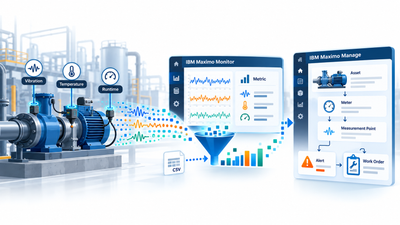
Machines can produce thousands of values every hour. Bearing temperature, pump vibration, motor current, and runtime do not become maintenance information merely because they have been recorded. They become useful when they are assigned to the correct equipment, interpreted in context, and connected to an appropriate response.
IBM® Maximo® Application Suite can support this path through Maximo Monitor and Maximo Manage. The goal is not to forward every sensor sample. The design must decide which data remains in a time series, which values are aggregated, and which values become meter readings used by maintenance processes.
A simplified chain looks like this:
sensor → Device → Metric → aggregation or calculation → Asset or Location + Meter → Measurement Point → alert or work order
The meaning and mapping of the data determine whether the connection is useful. Connecting a sensor is only the first step.
The screenshots show the Czech-language interface of a Maximo Monitor 9.2 pilot instance captured on October 16, 2026. The vibration and temperature values are simulated data uploaded from CSV files. The screenshots demonstrate Monitor configuration and data ingestion; they do not demonstrate a completed integration with Maximo Manage.
From an operational signal to a data model
The source can be a sensor, PLC, SCADA system, gateway, historian, or another operational system. A single motor might provide bearing temperature, vibration, current, rotational speed, and runtime.
Maximo Monitor groups devices by Device Type. Shared properties and Metrics are defined at this level, while a Device represents an individual data source. A Metric is a measured or derived value such as BearingTemperature, VibrationRMS, or RuntimeHours.
The Maximo Monitor 9.2 architecture differs from earlier versions. The original IoT Platform is optional, and Monitor directly manages devices, gateways, and their authentication. The IoT component can still support existing MQTT flows, but it is no longer required for standard device management and event ingestion. See our IBM Maximo Application Suite 9.2 article for a broader overview of the release.
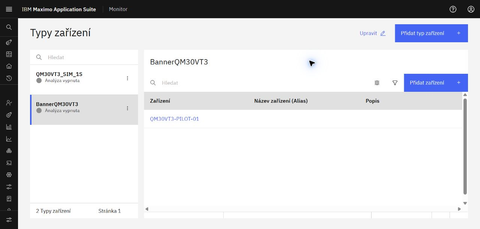
A pilot Device Type and Device prepared for simulated data ingestion.
A Metric is not a Meter
The similar names describe different layers of the solution.
Metric in Maximo Monitor
A Metric describes an operational value received from a device or calculated from its data. Monitor stores values over time, displays them, and supports batch data metrics. These can calculate an hourly maximum, a daily mean, or another aggregation at a defined time grain.
Since version 9.1, streaming data metrics are no longer an available current feature in the Monitor documentation. New calculations use batch data metrics. This matters when older designs or tutorials are reused.
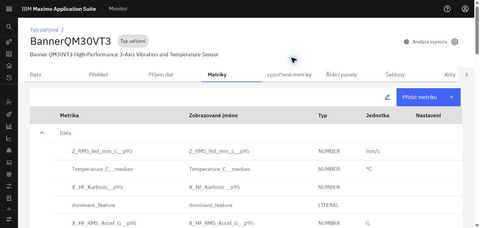
Metrics define the values that Monitor receives or derives.
Meter in Maximo Manage
A Meter is a logical meter associated with an Asset or Location in Maximo Manage. Organizations use meters to track equipment usage and condition. IBM defines three types:
| Meter type | What it records | Typical use |
|---|---|---|
| Continuous | a value that increases over time | runtime, mileage, cycle count |
| Gauge | a fluctuating numeric value | temperature, pressure, vibration |
| Characteristic | a qualitative state from defined values | oil color, cleanliness, equipment state |
A Continuous Meter typically supports usage-based maintenance. Gauge and Characteristic Meters can support Condition Monitoring. In short, a Metric describes device data; a Meter expresses a value used by Maximo Manage in a maintenance context.
The connection is more than matching names. The Metric ID on an Asset or Location Meter associates it with a metric from an operational monitoring system. Asset Data Dictionary integration and the IOTCONNECTOR task can then retrieve selected data as Meter Readings. Identifiers, timestamps, units, polling intervals, and history rules all need an explicit design.
Why every sample should not go to Maximo Manage
A sensor that sends one value per second produces 86,400 samples per day. The detailed time series can be valuable for diagnostics, but a technician rarely needs every sample as a separate Meter Reading.
Maintenance may benefit more from:
- the hourly maximum vibration,
- a mean and variance over a defined interval,
- a trend or rate of change,
- the number of operating-limit violations,
- a calculated anomaly score.
Maximo Monitor can retain raw data according to its retention settings while creating derived metrics. Manage then receives the value needed by a specific process. This preserves diagnostic detail without treating an operational time series as meter-reading history.
The aggregation must match the physical phenomenon. An average can hide a short but serious peak, while a maximum alone might not describe gradual degradation. Granularity is part of the meaning of the data, not merely a technical setting.
Three examples of different decisions
Pump vibration
A vibration flow might be:
sensor → VibrationRMS → Maximo Monitor → hourly maximum → Gauge Meter → Measurement Point
Monitor retains a more detailed trace for analysis. Manage receives an aggregated value at a defined interval if that value matches the maintenance rule. A Measurement Point can then compare it with warning and action limits.
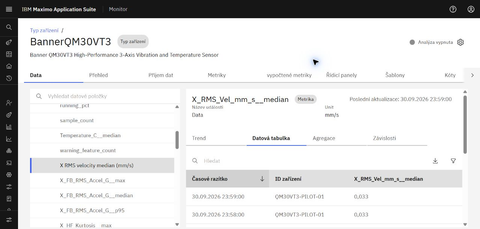
Simulated one-minute vibration data in the pilot; this is not evidence of a Meter Reading created in Manage.
Motor bearing temperature
A value of 72°C does not indicate whether a motor is healthy without context. The equipment, operating state, normal range, trend, and measurement conditions all matter.
The flow might be:
temperature sensor → BearingTemperature → Maximo Monitor → Gauge Meter → Measurement Point
Seventy-two degrees may be normal for one motor and abnormal for another. Limits should not be copied between assets without assessing their design and operating conditions.
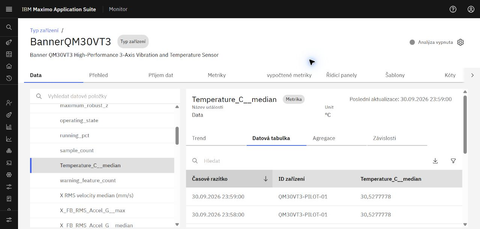
The simulated one-minute temperature shows a value over time in Monitor; it does not determine equipment condition by itself.
Conveyor runtime
Runtime describes usage rather than condition:
PLC → RuntimeHours → Continuous Meter → PM after 2,000 operating hours
A meter-based PM can generate work based on actual equipment usage. This differs from a purely calendar-based plan such as every six months. Maximo can also combine the two principles—for example, every 2,000 hours or six months, whichever comes first.
Condition Monitoring: a limit alone does not create a work order
The Condition Monitoring application uses Measurement Points for Assets or Locations. A Measurement Point defines acceptable values for a Gauge or Characteristic Meter and the rules for the subsequent response.
For a Gauge Meter, warning limits can generate an alert and action limits can support work-order generation. An action limit alone is not sufficient, however. Work-order generation also requires the relevant Job Plan or PM and a correctly configured generation mechanism. Characteristic Meters use comparable action-value rules.
The chain is therefore not “threshold exceeded = always create a work order.” It is:
Meter Reading → Measurement Point evaluation → configured alert and/or work order
This separates an informative deviation, a request for inspection, and an event that should create planned work.
Calendar, usage, condition, anomaly, and prediction
These approaches answer different questions:
- calendar-based preventive maintenance triggers work after elapsed time;
- usage-based maintenance uses a Continuous Meter such as runtime or cycles;
- condition-based maintenance responds to current condition, such as an exceeded action limit;
- anomaly detection identifies a departure from normal behavior without relying on one fixed threshold;
- predictive maintenance uses historical, operational, and maintenance data to estimate future degradation or failure.
Maximo Predict can calculate results such as estimated time to failure, failure probability within a selected prediction window, or anomaly-score trends. A rule such as temperature > 80°C is therefore not predictive maintenance. It is a useful condition-monitoring rule about the current state, not an estimate of future failure.
Historical data as a controlled starting point
A pilot does not have to begin with a live connection to an entire plant. Maximo Monitor 9.2 supports CSV time-series ingestion through the user interface, APIs, or external systems including Edge Data Collector. A CSV file contains a timestamp, a device identifier, and at least one metric, and the data is validated against the Device Type definition.
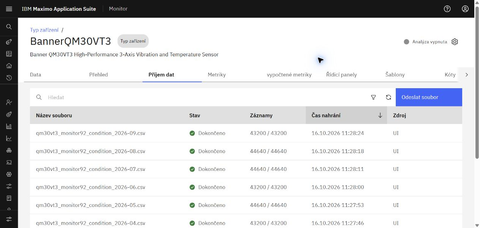
The pilot import history shows file-processing status and record counts.
Manual UI upload is intended mainly for smaller or one-time batches and has a 50 MB file limit. IBM documents APIs and object storage for larger or recurring transfers. During connectivity failures, Edge Data Collector can buffer data in CSV files and later send it to the ingestion pipeline. CSV is therefore a supported batch path with defined operating constraints, not a universal replacement for online integration.
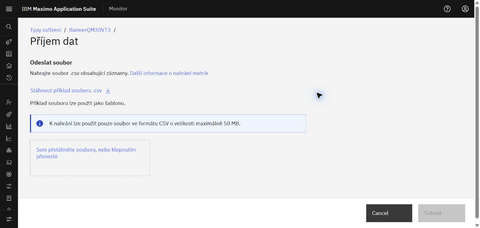
The Monitor UI states a maximum file size of 50 MB for manual uploads.
A practical pilot can:
- select one equipment type and one maintenance decision;
- define a few relevant values and their units;
- create the Device Type, Devices, and Metrics;
- ingest historical data and check its quality;
- test an appropriate time grain and batch data metrics;
- assign devices to an Asset or Location;
- decide which metric should be associated with a Meter;
- test Meter Readings, limits, and the resulting response.
If the historical values come from an older CMMS or EAM, their meaning and quality matter as much as the export format. The same principle is covered in our article on migrating data to IBM Maximo.
The hard part is deciding what the data means
Technical connectivity is only the beginning. The operational design must answer:
- Which signal belongs to which Asset or Location?
- Is the value a raw measurement, an aggregation, or state information?
- Which time grain preserves the important behavior?
- What should remain in Monitor, and what should become a Meter Reading in Manage?
- When is an alert sufficient, and when should a work order be created?
- Does the use case belong to usage-based PM, Condition Monitoring, anomaly detection, or actual prediction?
A sound data flow does not create the largest possible database. It creates a reliable relationship between a measurement, a specific item of equipment, and a maintenance decision.
Start with a pilot built around one decision
There is no need to begin with a large IoT program. A pilot can focus on one equipment type, a few variables, and historical data. 12servis can help design the data model, map Devices and Metrics to Assets and Meters, choose aggregations, and connect the result to Condition Monitoring.
The first objective should not be to connect as many sensors as possible. It should be to prove that selected data leads to a clear and useful maintenance decision.
Sources
Technical information was verified against IBM documentation on October 19, 2026.
- IBM Documentation: Technical overview of Maximo Monitor 9.2
- IBM Documentation: Creating device types
- IBM Documentation: CSV file ingestion
- IBM Documentation: Defining calculations
- IBM Documentation: IoT device data integration overview
- IBM Documentation: Meters
- IBM Documentation: Condition Monitoring
- IBM Documentation: Condition Monitoring measurement point field rules
- IBM Documentation: Master Preventive Maintenance records
- IBM Documentation: IBM Maximo Predict